Running a music event is craft. We treat it like one. Most of that craft is invisible until it fails at the door, at 23:00, with forty people waiting and a headliner's contingent nobody can currently confirm.
Where the night actually gets lost
Take a four-floor club in Berlin, 220 capacity on the main room. A Thursday runs three artists, each with their own contingent: a headliner's twelve, two support acts' six apiece. By door time those two dozen names exist in a spreadsheet the booker exported at lunch, a WhatsApp screenshot from the second artist because the spreadsheet had already gone stale, and whatever the door person remembers from a hallway conversation forty minutes before doors.
Nobody at the door has the current number. Everybody is guessing generously, because turning away someone who was actually on the list is worse than letting in a plus one who was not. That guess compounds over a night: a room that reads "sold out" on paper is quietly two rows of no shows and a dozen unlogged walk-ins away from the real count.
None of this is a staffing problem. The people working the door are good at their job. The list they are working from is the problem: it was correct once, at export time, and has been decaying ever since.
One link, not four systems
The fix is not a better spreadsheet. It is one link per artist, not a document. An artist gets their own contingent as a total head quota, not a fixed list of names: twelve heads, spend them however the artist wants. They add a guest from that link the afternoon of the show, and the quota bar moves as they type. No account, no app to install, no export to email back.
The door reads the exact same list, because it is the exact same list. A static code at the booth resolves to tonight's event automatically, so nobody sets anything up night to night. The number a booker checks backstage and the number a door person sees on their phone are the same number, updated at the same moment.
What the categories are actually for
Not every name at the door means the same thing, and pretending otherwise is where door pricing quietly breaks. A twelve person contingent might resolve to eight names on the guestlist proper, free entry, three on a friends tier at half price, one on a skip list, full price but no queue. Each category carries its own price logic, so the door does not have to remember a rule per artist per night.
A party of five arrives as three. The count only means anything if it counts heads, not rows. a booker, four-floor club, Berlin
Walk ins are the fourth category, and the only one the door adds itself: a name and a plus count, entered in the same list, priced full, counted in the same total. Nothing about a walk in lives anywhere else.
This is the door module.
One hand, one tap per party, live everywhere the room is counted.
Checking a party in without losing the room
The door person's job on a busy night is speed without losing track of who already came through. In practice that is five steps, repeated a few hundred times a night:
- 1Open the door link. It resolves to tonight's event automatically. No login for staff who only work the door.
- 2Search a name, or read straight down the resolved list. The list is already sorted and filtered by who is still expected.
- 3Tap the row. A party checks in as one block, or per head for a split arrival, five names showing up across three separate taxis.
- 4Add a walk in with one hand. A name, a plus count, done. It is already priced and counted correctly.
- 5Watch the room total. It is the same figure the promoter reads backstage, not a door only estimate reconciled the next morning.
The screen the door person sees
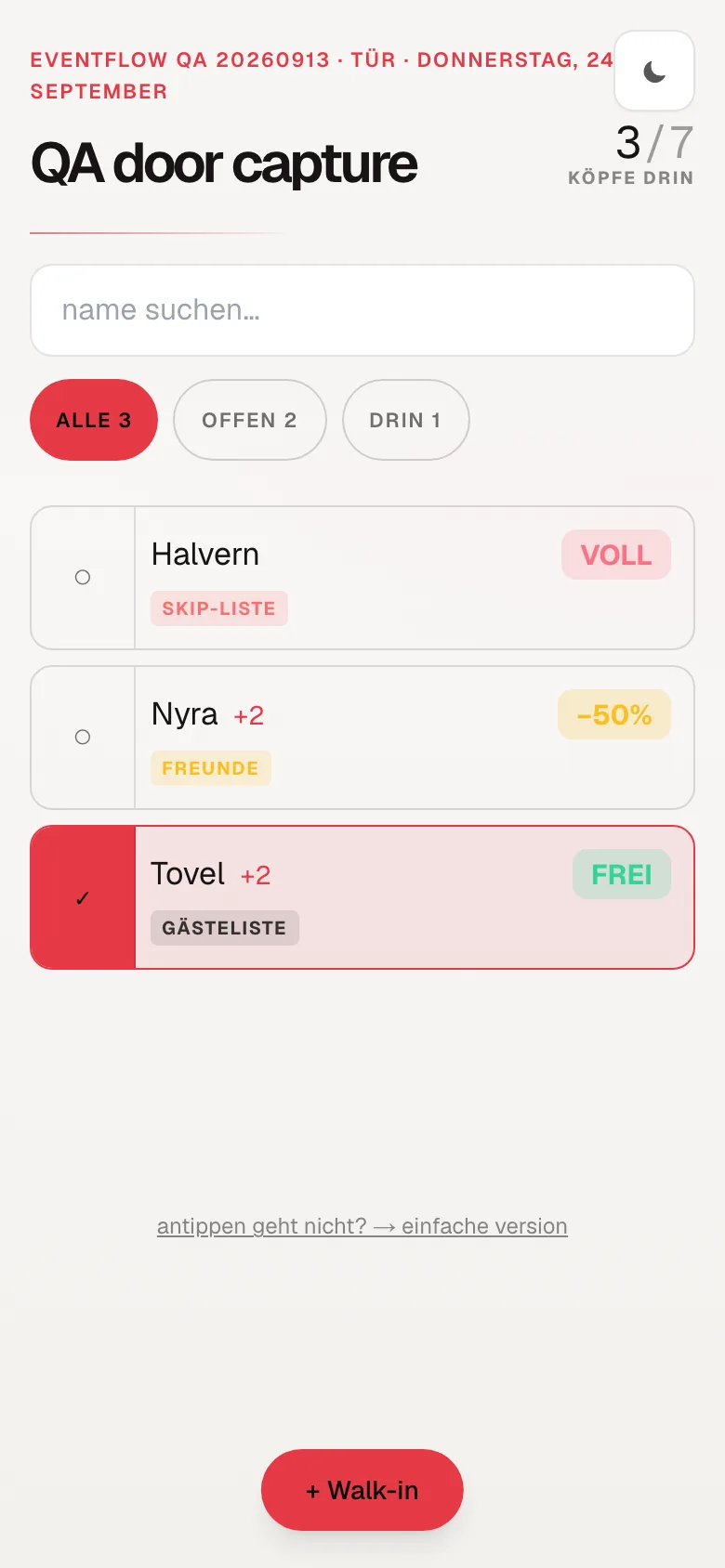
This is the door view itself: search at the top, filter chips for all, still open, and already in, and a scrollable list of tonight's names with their category and price resolved. Nothing here is typed twice.
What this does not do yet
Worth saying plainly, because a tool that overclaims at the door is worse than one that underclaims. The door view does not print wristbands or take payment, cash and card readers still happen the way they always have. It also assumes one device works the door at a time. A second phone reads the same list, but handing off a half finished check in mid party between two devices is not something we have built yet. Neither is offline mode: the door needs a connection, the same way the rest of the room does.
The door was always going to be busy. It does not have to be blind.
If this sounds like your room, talk to us. Request access and bring your own back catalogue of Thursdays.